
A fashion product page has one job: to let a shopper feel sure enough to buy. Sure of what the piece looks like on a body, sure of the size, sure of when it arrives, and sure it is worth the price. Every part of Selvedge's product page serves one of those.
Open any product in the theme editor (choose Products in the page selector at the top) and select Product information in the sidebar.
Choose a page design
Page design sets the overall arrangement:
| Design | Looks like | Suits |
|---|---|---|
| Classic | Photos beside the details | Most shops; works with every gallery layout |
| Editorial | Details beside full-height images that scroll past | Campaign photography, occasion wear |
| Split screen | A fixed image viewer on one side, details on the other | Few, very strong photos per product |
| Atelier | A strip of images above centered details | Accessories, small products, a magazine feel |
For the classic design, Media layout on large screens chooses the gallery: a two-column grid, a mosaic of mixed sizes, a slider with thumbnails, or a plain slider. Media width on large screens sets how much of the page the photos take. On phones every design becomes a swipeable gallery with the details below.
Gallery settings
| Setting | What it does |
|---|---|
| Colour glow behind photos, Glow strength | A soft glow in the photo's own color behind the gallery: warm, editorial, and subtle on light schemes |
| Open images in full screen | Tapping a photo opens a full-screen viewer with zoom and swipe |
| Magnify images on hover | On computers, a loupe follows the pointer to show the fabric |
| Show only images of the selected color | The gallery follows the chosen color: shoppers see the navy photos when they pick navy |
For Show only images of the selected color to work, give each photo alt text that includes its color name, for example "Linen shirt in navy, front". Selvedge matches the photo to the color through the alt text.
Keep the details in view
- Keep product information visible while scrolling: while shoppers scroll through the photos, the price, sizes and button stay beside them.
- Show product details on a raised panel: the details sit on a soft card, which reads well on dark styles and busy photography.
- Show sticky buy bar: once the main button has scrolled away, a slim bar with the product, price and add to cart appears, on phones and computers.
The blocks, in the order shoppers ask
The details column is made of blocks. Drag them into the order that suits your products; hide any you do not need. A good order follows the questions a shopper asks:
What is it, and how much?
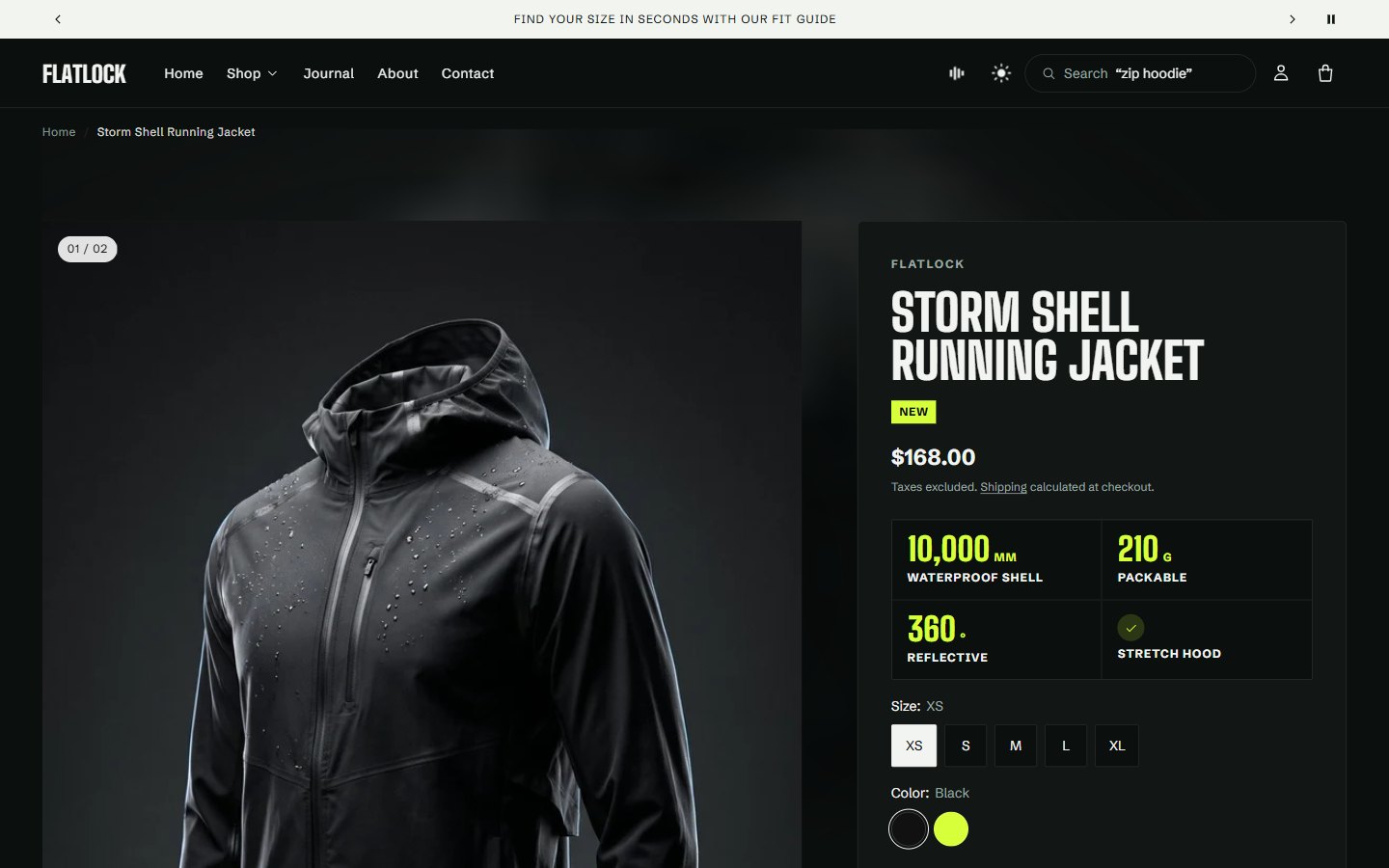
- Vendor, Title and Badges (sale, new, low stock).
- Price, with tax and shipping information, and the lowest price of the last 30 days where EU rules need it.
- Performance specs: for sportswear, the product's key numbers as chips ("10,000 mm waterproof", "210 g"). See product anatomy.
- Text: a short line in body, subtle or label style, for a promise such as "Made in Portugal".
Which one, and will it fit?
- Variant picker: buttons or dropdowns for sizes; colors with swatches always show as swatches.
- Fit Studio: the Size guide and fit link with Find my size.
- Model information: "Model is 178 cm and wears M."
- Fit scale: runs small, true to size or runs large.
- Garment measurements, Size conversion and Size and color stock.
- Ratings and fit: stars, and how reviewers found the size.
All of these are explained in the fit system.
Can I have it?
- Quantity selector and Inventory status ("Only 3 left").
- Buy buttons: add to cart, with the dynamic checkout buttons (Shop Pay, Apple Pay, PayPal), the recipient form for gift cards, pickup availability, a back-in-stock form on sold-out variants and a pre-order message.
- SKU, for shops whose shoppers order by reference.
- Quick order list, for wholesale buyers ordering many sizes at once.
When will it arrive, and can I return it?
- Delivery and returns: the delivery estimate ("Arrives Tue 12 to Thu 14 Nov"), your returns message linked to your refund policy, and an extra line such as "Duties and taxes included".
- Trust and payment: free shipping threshold, returns window, secure checkout and payment icons, in one tidy row.
What is it made of, and is it worth it?
- Description, on its own or folded into a row.
- Materials and care and Product passport: see materials and passport.
- Collapsible row: any extra topic, written in place or taken from a page, such as "Shipping" or "How we make it".
What goes with it?
- Shop the look: pins up to four products on one of the photos; shoppers add them from there. See looks and lookbooks.
- Complementary products: pieces chosen in Shopify's Search & Discovery app.
- Share, Custom Liquid and Apps for anything else, such as a reviews app block.
Block orders that work
Different products need different answers first. Three tested orders:
| Product | Block order |
|---|---|
| Everyday clothing (dresses, knits, shirts) | Title, Price, Badges, Variant picker, Fit Studio, Model information, Buy buttons, Delivery and returns, Description, Materials and care, Shop the look |
| Technical and sportswear | Title, Price, Performance specs, Variant picker, Fit Studio, Fit scale, Buy buttons, Delivery and returns, Trust and payment, Description, Materials and care |
| Denim and tailoring | Title, Price, Variant picker, Fit Studio, Garment measurements, Fit scale, Model information, Buy buttons, Delivery and returns, Product passport, Description |
Keep the buy button within the first screen on a phone. If it slips below, move the description and long blocks under it, or fold them into collapsible rows.
Writing the details
- Title: the product's name and what it is: "Pace 5-inch running shorts", not a code.
- Description: two short paragraphs. The first says how it feels and when to wear it; the second gives the facts. Put fabric and care in the Materials block, not here.
- Badges: let Selvedge show sale, new and low stock automatically; avoid custom badges that compete.
- Photos: front, back, side, a detail, and the piece on a model. Five to eight photos is the sweet spot.
Sections under the product
Below Product information you can add any section. Strong choices for fashion:
- Product anatomy for technical pieces.
- Related products and Recently viewed.
- Scrolling text with your promises, or Image with text about the fabric.
Five templates
Selvedge comes with five product templates: the default, atelier, editorial, mosaic and split. Each starts from a different page design and set of sections. To use one for a product, open the product in the admin and choose it under Theme template. To make your own, for example a template for denim with garment measurements, open the template selector in the editor and select Create template.
One template, a whole catalog
Typing details into the editor works for one product. For a catalog, connect block settings to metafields so each product brings its own values:
| Block setting | Metafield to connect |
|---|---|
| Fit Studio > Size guide page | Page reference: a size guide per product type |
| Fit Studio > Fit, Fit scale > Fit | Single line text: small, true or large |
| Model information > Text | Single line text |
| Buy buttons > Pre-order message | Single line text: the ship date |
| Materials and care, Product passport | Text fields, per product |
| Product anatomy | custom.anatomy, multi-line text |
Create the definitions in SettingsCustom dataProducts, then select the dynamic source button beside each setting in the theme editor.
Questions merchants ask
My product page has no size guide link
The Fit Studio block shows only when a size guide page is chosen, in the block or in Theme settings > Size and fit.
The gallery shows every color's photos
Turn on Show only images of the selected color, and include the color name in each photo's alt text.
Can different products use different layouts?
Yes, with templates. Create a template with the design you want and assign it to those products under Theme template.
Where do review stars come from?
From your reviews app. Apps that write Shopify's standard reviews data show their rating in the Ratings and fit block; most also offer an app block for the full reviews list.
Was this guide helpful?
Still need help?Write to us with your shop's address and a screenshot. We reply within two business days, Monday to Friday, usually sooner.
Contact support